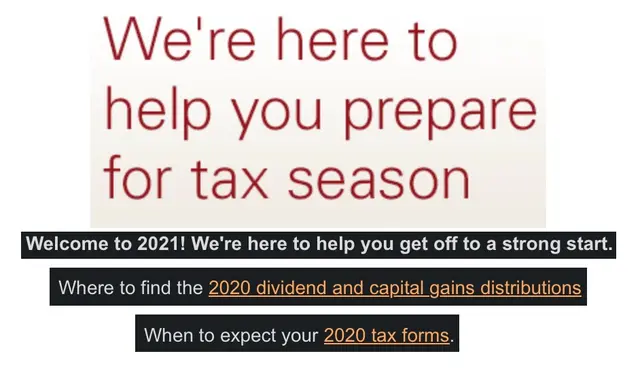
I received a strange email on the last day of 2025 (excerpts above). The email said “Welcome to 2021!”. Hmmm… If the email had said “Welcome to 2025!”, I probably would have ignored the email and clicked “delete”. But 2021 caught my attention – that year was an eternity ago!
My Reaction
My first thought was that I was looking at a five year old email. My email archive contains messages going back to 2010, so it is certainly possible that an old email somehow found its way into my Inbox. I quickly dispelled this idea by checking the receipt date on the email: Dec 31, 2025. I even checked the raw email headers1 to be certain: The email was sent to me on Dec 31, 2025.
I briefly pondered whether this email had been traversing the Internet for five long years. Sound impossible? Not totally. I did after all receive an email welcoming me to 2021 on the last day of 2025!
I have separate email addresses from several different providers that I use for various purposes. I forward messages from all those email accounts to my primary email account. Did I perhaps accidentally create a forwarding loop, where provider A forwards to provider B, then provider B forwards back to provider A, ad infinitum? No, this email was sent to an email address I use regularly and was not forwarded. So no, this email had not been traversing the Internet for five long years2.
After eliminating all the scenarios I could think of in which I did something stupid, I started thinking that perhaps the sender was to blame. But this email was from a large, well-known financial provider (I am not sharing their name, but you would definitely recognize them). Surely they wouldn’t make such a mistake? And, being off by one year (Welcome to 2025!) seems believable – it often takes me until March to “get used to” the new year – but being off by five years? How is it possible to be off by five years?
About twelve hours later, the financial provider sent an email admitting that their earlier email contained “outdated” tax planning information. (They didn’t mention that the “outdated” information was FIVE YEARS out of date! And rather than immediately correcting their mistake, they promised to send updated information “next week” (when all their employees had returned from their New Years vacations?).
How Did This Happen?
OK, I’ve teased this vendor enough. They admitted their mistake. They did not explain how the mistake happened, but we can surmise a few things:
- The vendor sent the email using an automated system
- The email was not proofread before sending
- Someone apparently did not understand the automated system
- The automated system was not “smart” in that it did not recognize it was sending a five year old email.
- The email hard-coded3 the year “2021”
My theory about what happened? Before taking off for holiday vacation, the employee who knows how to run this company’s automated email system wrote detailed instructions to their manager describing how to send out the yearly “Welcome to the New Year” email. That employee then flew to Hawaii, trusting that their manager would be able to follow the instructions and send out the email correctly.
While that employee was vacationing in Hawaii, their manager fat-fingered4 sending the annual email, resulting in a five year old email being sent accidentally. The vacationing employee, while sipping a Mai Tai on the beach, noticed that their boss sent the wrong email. Oops! He messaged his boss, saying that he would send out the correct email “next week” when he returned from vacation.
Does this scenario sound possible? Having worked as both a software developer and manager for many years, I think it is very likely!
How to Avoid
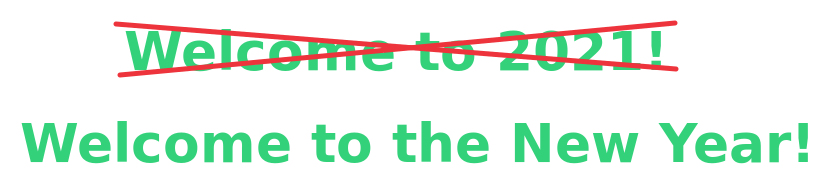
One simple way to avoid this type of mistake is to write more generic emails. Instead of “Welcome to 2021”, the email could have said “Welcome to the New Year” or “Happy New Year”. And rather than the email containing year-specific links to tax information, it could have included a permalink5 to a tax planning web page that contains year-specific links. This way, the email would apply to any year, not just 2021.
No Hard-Coding: Use Templates
A cardinal rule of software development is “no hard-coding”. What is hard-coding? This is where you put information in your software code that may change in the future.
For example, the footer of the Retired Engineer blog contains a copyright notice for the years 2024-2026. I started this blog in 2024, so I hard-coded the start date as “2024” since the blog start date will never change. But the current year “2026” will definitely change, assuming that I continue adding new posts each year. I therefore use a template6 in the footer that replaces the “to” copyright date with the current year each time the blog is rebuilt (which occurs every time I add a new post). So when the calendar rolled over into 2026, I did not need to update that date – the blog build process updated the date automatically. If I had hard-coded that date as “2025” rather than using a template, then each year I would have to remember to update the copyright date (which I would inevitably forget to do).
While this example applies to software development, it can also be applied more broadly. For instance, when I wrote documents as an engineer, I tried to state any information that might change in a single place within the document to make the document easier to update if necessary.
Do Regression Testing
Software developers should develop regression tests for their software. These tests are run each time the software is built. For an automated email, it might be a good idea to simply send the email to a single (or multiple) reviewers before it is broadcast to the public. I built a review mode into the email sending software I wrote for this blog, so that I can preview an automated email before it is sent to my mailing list.
Document Procedures
Also, an “Operations Manual” could be created that has instructions for making changes and how/when these changes should be made. However, the big problem with this approach is that someone needs to remember to check the manual. This could be mitigated with an automated calendar reminder “Check the manual!”. But what happens if the employee who has the manual leaves the company? Maybe write another manual for handling that eventuality?
Many times during my career, I saw problems “fixed” by creating documentation rather than by improving the software. And inevitably, no one ever read that documentation.
My point is… Fix the problem properly with software automation and templates, not with manuals/documentation.
Conclusion
Mistakes due to hard-coding are ubiquitous. Company’s should put processes such as those described above in place to avoid embarrassing themselves and tarnishing their reputations. It is worth spending the additional time to code something properly rather than hard-coding!
Dear readers – I wish you all a joyous and prosperous {{ now.Format ‘2000’ }}!
-
Raw email headers are control messages that email servers attach to emails. These headers are how email servers talk to each other. They include information such as: date sent, date received, path email took to arrive in your Inbox, spam score for the email (how likely the email is to be spam). Most email programs hide these headers, but some offer an option to view them. If you are really bored someday, check out the headers on the email you receive! ↩︎
-
Email servers detect forwarding loops by looking at the raw email headers, so it is extremely unlikely that an email would be forwarded back and forth between various email servers for five years. ↩︎
-
From Wikipedia: Hard coding (also hard-coding or hardcoding) is the software development practice of embedding data directly into the source code of a program or other executable object, as opposed to obtaining the data from external sources or generating it at runtime. From the Retired Engineer: hard-coding is often a bad practice taken by programmers who are in a hurry, and often causes problem later (such as, when a Welcome to 2021 email is sent at the end of 2025). ↩︎
-
“Fat finger” is an informal term that refers to accidentally pressing the wrong button on a keyboard or device, often resulting in a typographical error. ↩︎
-
A permalink is a URL that never changes even if a website is restructured. The content of the page may change, but the address of the page does not. ↩︎
-
A template is a special flag included in text that is interpreted by the software processing the text. That software replaces the “template” while processing the text. For instance, my blog’s copyright date in written in the blog code as “Copyright 2024-{{ now.Format ‘2000’}}”. The software that builds the blog interprets the “{{ }}” delimiter as a template that it needs to process. It then looks inside the delimiters and recognizes the keyword “now” which it knows to replace with the current date. It also uses ‘2000 to tell it how to format the current date: as a four-digit year. So, rather than displaying “Copyright 2024-{{ now.Format ‘2000’}}”, the software processing the text outputs “Copyright 2024-2026” (when run in the year 2026). ↩︎